Pro
Alias
If you use the Docker image (see System Setup)
and you haven't set up the pandock alias yet, replace pandock with
docker run --rm -it --user $(id -u):$(id -g) -v .:/data schuam/dac:v1.0.0
in the following commands. If you installed Pandoc directly on your system,
replace pandock with just pandoc. For more information, refer to the
System Setup page.
Note
All commands in this tutorial should be run from within the project
directory (solution) that was mentioned on the Layout page.
Make sure you're in the correct directory. If you put the solutions
directory into your home directory, you can navigate to the solutions
directory like so:
cd
cd solution
If you placed the solutions project somewhere else, use the appropriate
cd command to navigate to that place.
Now, it's time to explore how to customize the LaTeX template used by Pandoc, or even how to create your own.
Tip
While it’s possible to write a template from scratch or strip the default template down to the bare essentials, I wouldn’t recommend it. When I first started customizing templates, I took the default one, removed everything I thought was unnecessary, and made it look the way I wanted. This worked for a while, but as soon as I needed a new type of table or when Pandoc released a new version, my document generation broke. Worse yet, it was difficult to troubleshoot because my template was so different from the original that it was hard to see what caused the issues I encountered.
That’s why I recommend keeping your template as close to the default as possible. This will make future adjustments easier, especially when new Pandoc versions are released. You may even find that no updates to your template are required.
First, let's retrieve Pandoc's default LaTeX template. We'll add a new
directory to our project's src directory called templates. Pandoc provides
an option to export templates for all its output formats. Since we’re working
with LaTeX, we’ll retrieve the LaTeX template. Here are the commands to run:
mkdir -p src/templates
pandock -D latex > src/templates/template_orig.latex
Let's take a look at the original template:
% Options for packages loaded elsewhere
\PassOptionsToPackage{unicode$for(hyperrefoptions)$,$hyperrefoptions$$endfor$}{hyperref}
\PassOptionsToPackage{hyphens}{url}
$if(colorlinks)$
\PassOptionsToPackage{dvipsnames,svgnames,x11names}{xcolor}
$endif$
$if(CJKmainfont)$
\PassOptionsToPackage{space}{xeCJK}
$endif$
%
\documentclass[
$if(fontsize)$
  $fontsize$,
$endif$
$if(papersize)$
  $papersize$paper,
$endif$
$if(beamer)$
  ignorenonframetext,
$if(handout)$
  handout,
$endif$
$if(aspectratio)$
  aspectratio=$aspectratio$,
$endif$
$endif$
$for(classoption)$
  $classoption$$sep$,
$endfor$
]{$documentclass$}
$if(beamer)$
$if(background-image)$
\usebackgroundtemplate{%
  \includegraphics[width=\paperwidth]{$background-image$}%
}
$endif$
\usepackage{pgfpages}
\setbeamertemplate{caption}[numbered]
\setbeamertemplate{caption label separator}{: }
\setbeamercolor{caption name}{fg=normal text.fg}
\beamertemplatenavigationsymbols$if(navigation)$$navigation$$else$empty$endif$
$for(beameroption)$
\setbeameroption{$beameroption$}
$endfor$
% Prevent slide breaks in the middle of a paragraph
\widowpenalties 1 10000
\raggedbottom
$if(section-titles)$
\setbeamertemplate{part page}{
  \centering
  \begin{beamercolorbox}[sep=16pt,center]{part title}
    \usebeamerfont{part title}\insertpart\par
  \end{beamercolorbox}
}
\setbeamertemplate{section page}{
  \centering
  \begin{beamercolorbox}[sep=12pt,center]{part title}
    \usebeamerfont{section title}\insertsection\par
  \end{beamercolorbox}
}
\setbeamertemplate{subsection page}{
  \centering
  \begin{beamercolorbox}[sep=8pt,center]{part title}
    \usebeamerfont{subsection title}\insertsubsection\par
  \end{beamercolorbox}
}
\AtBeginPart{
  \frame{\partpage}
}
\AtBeginSection{
  \ifbibliography
  \else
    \frame{\sectionpage}
  \fi
}
\AtBeginSubsection{
  \frame{\subsectionpage}
}
$endif$
$endif$
$if(beamerarticle)$
\usepackage{beamerarticle} % needs to be loaded first
$endif$
\usepackage{amsmath,amssymb}
$if(linestretch)$
\usepackage{setspace}
$endif$
\usepackage{iftex}
\ifPDFTeX
  \usepackage[$if(fontenc)$$fontenc$$else$T1$endif$]{fontenc}
  \usepackage[utf8]{inputenc}
  \usepackage{textcomp} % provide euro and other symbols
\else % if luatex or xetex
$if(mathspec)$
  \ifXeTeX
    \usepackage{mathspec} % this also loads fontspec
  \else
    \usepackage{unicode-math} % this also loads fontspec
  \fi
$else$
  \usepackage{unicode-math} % this also loads fontspec
$endif$
  \defaultfontfeatures{Scale=MatchLowercase}$-- must come before Beamer theme
  \defaultfontfeatures[\rmfamily]{Ligatures=TeX,Scale=1}
\fi
$if(fontfamily)$
$else$
$-- Set default font before Beamer theme so the theme can override it
\usepackage{lmodern}
$endif$
$-- Set Beamer theme before user font settings so they can override theme
$if(beamer)$
$if(theme)$
\usetheme[$for(themeoptions)$$themeoptions$$sep$,$endfor$]{$theme$}
$endif$
$if(colortheme)$
\usecolortheme{$colortheme$}
$endif$
$if(fonttheme)$
\usefonttheme{$fonttheme$}
$endif$
$if(mainfont)$
\usefonttheme{serif} % use mainfont rather than sansfont for slide text
$endif$
$if(innertheme)$
\useinnertheme{$innertheme$}
$endif$
$if(outertheme)$
\useoutertheme{$outertheme$}
$endif$
$endif$
$-- User font settings (must come after default font and Beamer theme)
$if(fontfamily)$
\usepackage[$for(fontfamilyoptions)$$fontfamilyoptions$$sep$,$endfor$]{$fontfamily$}
$endif$
\ifPDFTeX\else
  % xetex/luatex font selection
$if(mainfont)$
  \setmainfont[$for(mainfontoptions)$$mainfontoptions$$sep$,$endfor$]{$mainfont$}
$endif$
$if(sansfont)$
  \setsansfont[$for(sansfontoptions)$$sansfontoptions$$sep$,$endfor$]{$sansfont$}
$endif$
$if(monofont)$
  \setmonofont[$for(monofontoptions)$$monofontoptions$$sep$,$endfor$]{$monofont$}
$endif$
$for(fontfamilies)$
  \newfontfamily{$fontfamilies.name$}[$for(fontfamilies.options)$$fontfamilies.options$$sep$,$endfor$]{$fontfamilies.font$}
$endfor$
$if(mathfont)$
$if(mathspec)$
  \ifXeTeX
    \setmathfont(Digits,Latin,Greek)[$for(mathfontoptions)$$mathfontoptions$$sep$,$endfor$]{$mathfont$}
  \else
    \setmathfont[$for(mathfontoptions)$$mathfontoptions$$sep$,$endfor$]{$mathfont$}
  \fi
$else$
  \setmathfont[$for(mathfontoptions)$$mathfontoptions$$sep$,$endfor$]{$mathfont$}
$endif$
$endif$
$if(CJKmainfont)$
  \ifXeTeX
    \usepackage{xeCJK}
    \setCJKmainfont[$for(CJKoptions)$$CJKoptions$$sep$,$endfor$]{$CJKmainfont$}
    $if(CJKsansfont)$
      \setCJKsansfont[$for(CJKoptions)$$CJKoptions$$sep$,$endfor$]{$CJKsansfont$}
    $endif$
    $if(CJKmonofont)$
      \setCJKmonofont[$for(CJKoptions)$$CJKoptions$$sep$,$endfor$]{$CJKmonofont$}
    $endif$
  \fi
$endif$
$if(luatexjapresetoptions)$
  \ifLuaTeX
    \usepackage[$for(luatexjapresetoptions)$$luatexjapresetoptions$$sep$,$endfor$]{luatexja-preset}
  \fi
$endif$
$if(CJKmainfont)$
  \ifLuaTeX
    \usepackage[$for(luatexjafontspecoptions)$$luatexjafontspecoptions$$sep$,$endfor$]{luatexja-fontspec}
    \setmainjfont[$for(CJKoptions)$$CJKoptions$$sep$,$endfor$]{$CJKmainfont$}
  \fi
$endif$
\fi
$if(zero-width-non-joiner)$
%% Support for zero-width non-joiner characters.
\makeatletter
\def\zerowidthnonjoiner{%
  % Prevent ligatures and adjust kerning, but still support hyphenating.
  \texorpdfstring{%
    \TextOrMath{\nobreak\discretionary{-}{}{\kern.03em}%
      \ifvmode\else\nobreak\hskip\z@skip\fi}{}%
  }{}%
}
\makeatother
\ifPDFTeX
  \DeclareUnicodeCharacter{200C}{\zerowidthnonjoiner}
\else
  \catcode`^^^^200c=\active
  \protected\def ^^^^200c{\zerowidthnonjoiner}
\fi
%% End of ZWNJ support
$endif$
% Use upquote if available, for straight quotes in verbatim environments
\IfFileExists{upquote.sty}{\usepackage{upquote}}{}
\IfFileExists{microtype.sty}{% use microtype if available
  \usepackage[$for(microtypeoptions)$$microtypeoptions$$sep$,$endfor$]{microtype}
  \UseMicrotypeSet[protrusion]{basicmath} % disable protrusion for tt fonts
}{}
$if(indent)$
$else$
\makeatletter
\@ifundefined{KOMAClassName}{% if non-KOMA class
  \IfFileExists{parskip.sty}{%
    \usepackage{parskip}
  }{% else
    \setlength{\parindent}{0pt}
    \setlength{\parskip}{6pt plus 2pt minus 1pt}}
}{% if KOMA class
  \KOMAoptions{parskip=half}}
\makeatother
$endif$
$if(verbatim-in-note)$
\usepackage{fancyvrb}
$endif$
\usepackage{xcolor}
$if(geometry)$
$if(beamer)$
\geometry{$for(geometry)$$geometry$$sep$,$endfor$}
$else$
\usepackage[$for(geometry)$$geometry$$sep$,$endfor$]{geometry}
$endif$
$endif$
$if(beamer)$
\newif\ifbibliography
$endif$
$if(listings)$
\usepackage{listings}
\newcommand{\passthrough}[1]{#1}
\lstset{defaultdialect=[5.3]Lua}
\lstset{defaultdialect=[x86masm]Assembler}
$endif$
$if(lhs)$
\lstnewenvironment{code}{\lstset{language=Haskell,basicstyle=\small\ttfamily}}{}
$endif$
$if(highlighting-macros)$
$highlighting-macros$
$endif$
$if(tables)$
\usepackage{longtable,booktabs,array}
$if(multirow)$
\usepackage{multirow}
$endif$
\usepackage{calc} % for calculating minipage widths
$if(beamer)$
\usepackage{caption}
% Make caption package work with longtable
\makeatletter
\def\fnum@table{\tablename~\thetable}
\makeatother
$else$
% Correct order of tables after \paragraph or \subparagraph
\usepackage{etoolbox}
\makeatletter
\patchcmd\longtable{\par}{\if@noskipsec\mbox{}\fi\par}{}{}
\makeatother
% Allow footnotes in longtable head/foot
\IfFileExists{footnotehyper.sty}{\usepackage{footnotehyper}}{\usepackage{footnote}}
\makesavenoteenv{longtable}
$endif$
$endif$
$if(graphics)$
\usepackage{graphicx}
\makeatletter
\def\maxwidth{\ifdim\Gin@nat@width>\linewidth\linewidth\else\Gin@nat@width\fi}
\def\maxheight{\ifdim\Gin@nat@height>\textheight\textheight\else\Gin@nat@height\fi}
\makeatother
% Scale images if necessary, so that they will not overflow the page
% margins by default, and it is still possible to overwrite the defaults
% using explicit options in \includegraphics[width, height, ...]{}
\setkeys{Gin}{width=\maxwidth,height=\maxheight,keepaspectratio}
% Set default figure placement to htbp
\makeatletter
\def\fps@figure{htbp}
\makeatother
$endif$
$if(svg)$
\usepackage{svg}
$endif$
$if(strikeout)$
$-- also used for underline
\usepackage{soul}
$endif$
\setlength{\emergencystretch}{3em} % prevent overfull lines
\providecommand{\tightlist}{%
  \setlength{\itemsep}{0pt}\setlength{\parskip}{0pt}}
$if(numbersections)$
\setcounter{secnumdepth}{$if(secnumdepth)$$secnumdepth$$else$5$endif$}
$else$
\setcounter{secnumdepth}{-\maxdimen} % remove section numbering
$endif$
$if(subfigure)$
\usepackage{subcaption}
$endif$
$if(beamer)$
$else$
$if(block-headings)$
% Make \paragraph and \subparagraph free-standing
\ifx\paragraph\undefined\else
  \let\oldparagraph\paragraph
  \renewcommand{\paragraph}[1]{\oldparagraph{#1}\mbox{}}
\fi
\ifx\subparagraph\undefined\else
  \let\oldsubparagraph\subparagraph
  \renewcommand{\subparagraph}[1]{\oldsubparagraph{#1}\mbox{}}
\fi
$endif$
$endif$
$if(pagestyle)$
\pagestyle{$pagestyle$}
$endif$
$if(csl-refs)$
\newlength{\cslhangindent}
\setlength{\cslhangindent}{1.5em}
\newlength{\csllabelwidth}
\setlength{\csllabelwidth}{3em}
\newlength{\cslentryspacingunit} % times entry-spacing
\setlength{\cslentryspacingunit}{\parskip}
\newenvironment{CSLReferences}[2] % #1 hanging-ident, #2 entry spacing
 {% don't indent paragraphs
  \setlength{\parindent}{0pt}
  % turn on hanging indent if param 1 is 1
  \ifodd #1
  \let\oldpar\par
  \def\par{\hangindent=\cslhangindent\oldpar}
  \fi
  % set entry spacing
  \setlength{\parskip}{#2\cslentryspacingunit}
 }%
 {}
\usepackage{calc}
\newcommand{\CSLBlock}[1]{#1\hfill\break}
\newcommand{\CSLLeftMargin}[1]{\parbox[t]{\csllabelwidth}{#1}}
\newcommand{\CSLRightInline}[1]{\parbox[t]{\linewidth - \csllabelwidth}{#1}\break}
\newcommand{\CSLIndent}[1]{\hspace{\cslhangindent}#1}
$endif$
$if(lang)$
\ifLuaTeX
\usepackage[bidi=basic]{babel}
\else
\usepackage[bidi=default]{babel}
\fi
$if(babel-lang)$
\babelprovide[main,import]{$babel-lang$}
$if(mainfont)$
\ifPDFTeX
\else
\babelfont[$babel-lang$]{rm}{$mainfont$}
\fi
$endif$
$endif$
$for(babel-otherlangs)$
\babelprovide[import]{$babel-otherlangs$}
$endfor$
% get rid of language-specific shorthands (see #6817):
\let\LanguageShortHands\languageshorthands
\def\languageshorthands#1{}
$endif$
$for(header-includes)$
$header-includes$
$endfor$
\ifLuaTeX
  \usepackage{selnolig}  % disable illegal ligatures
\fi
$if(dir)$
\ifPDFTeX
  \TeXXeTstate=1
  \newcommand{\RL}[1]{\beginR #1\endR}
  \newcommand{\LR}[1]{\beginL #1\endL}
  \newenvironment{RTL}{\beginR}{\endR}
  \newenvironment{LTR}{\beginL}{\endL}
\fi
$endif$
$if(natbib)$
\usepackage[$natbiboptions$]{natbib}
\bibliographystyle{$if(biblio-style)$$biblio-style$$else$plainnat$endif$}
$endif$
$if(biblatex)$
\usepackage[$if(biblio-style)$style=$biblio-style$,$endif$$for(biblatexoptions)$$biblatexoptions$$sep$,$endfor$]{biblatex}
$for(bibliography)$
\addbibresource{$bibliography$}
$endfor$
$endif$
$if(nocite-ids)$
\nocite{$for(nocite-ids)$$it$$sep$, $endfor$}
$endif$
$if(csquotes)$
\usepackage{csquotes}
$endif$
\IfFileExists{bookmark.sty}{\usepackage{bookmark}}{\usepackage{hyperref}}
\IfFileExists{xurl.sty}{\usepackage{xurl}}{} % add URL line breaks if available
\urlstyle{$if(urlstyle)$$urlstyle$$else$same$endif$}
$if(links-as-notes)$
% Make links footnotes instead of hotlinks:
\DeclareRobustCommand{\href}[2]{#2\footnote{\url{#1}}}
$endif$
$if(verbatim-in-note)$
\VerbatimFootnotes % allow verbatim text in footnotes
$endif$
\hypersetup{
$if(title-meta)$
  pdftitle={$title-meta$},
$endif$
$if(author-meta)$
  pdfauthor={$author-meta$},
$endif$
$if(lang)$
  pdflang={$lang$},
$endif$
$if(subject)$
  pdfsubject={$subject$},
$endif$
$if(keywords)$
  pdfkeywords={$for(keywords)$$keywords$$sep$, $endfor$},
$endif$
$if(colorlinks)$
  colorlinks=true,
  linkcolor={$if(linkcolor)$$linkcolor$$else$Maroon$endif$},
  filecolor={$if(filecolor)$$filecolor$$else$Maroon$endif$},
  citecolor={$if(citecolor)$$citecolor$$else$Blue$endif$},
  urlcolor={$if(urlcolor)$$urlcolor$$else$Blue$endif$},
$else$
$if(boxlinks)$
$else$
  hidelinks,
$endif$
$endif$
  pdfcreator={LaTeX via pandoc}}

$if(title)$
\title{$title$$if(thanks)$\thanks{$thanks$}$endif$}
$endif$
$if(subtitle)$
$if(beamer)$
$else$
\usepackage{etoolbox}
\makeatletter
\providecommand{\subtitle}[1]{% add subtitle to \maketitle
  \apptocmd{\@title}{\par {\large #1 \par}}{}{}
}
\makeatother
$endif$
\subtitle{$subtitle$}
$endif$
\author{$for(author)$$author$$sep$ \and $endfor$}
\date{$date$}
$if(beamer)$
$if(institute)$
\institute{$for(institute)$$institute$$sep$ \and $endfor$}
$endif$
$if(titlegraphic)$
\titlegraphic{\includegraphics{$titlegraphic$}}
$endif$
$if(logo)$
\logo{\includegraphics{$logo$}}
$endif$
$endif$

\begin{document}
$if(has-frontmatter)$
\frontmatter
$endif$
$if(title)$
$if(beamer)$
\frame{\titlepage}
$else$
\maketitle
$endif$
$if(abstract)$
\begin{abstract}
$abstract$
\end{abstract}
$endif$
$endif$

$for(include-before)$
$include-before$

$endfor$
$if(toc)$
$if(toc-title)$
\renewcommand*\contentsname{$toc-title$}
$endif$
$if(beamer)$
\begin{frame}[allowframebreaks]
$if(toc-title)$
  \frametitle{$toc-title$}
$endif$
  \tableofcontents[hideallsubsections]
\end{frame}
$else$
{
$if(colorlinks)$
\hypersetup{linkcolor=$if(toccolor)$$toccolor$$else$$endif$}
$endif$
\setcounter{tocdepth}{$toc-depth$}
\tableofcontents
}
$endif$
$endif$
$if(lof)$
\listoffigures
$endif$
$if(lot)$
\listoftables
$endif$
$if(linestretch)$
\setstretch{$linestretch$}
$endif$
$if(has-frontmatter)$
\mainmatter
$endif$
$body$

$if(has-frontmatter)$
\backmatter
$endif$
$if(natbib)$
$if(bibliography)$
$if(biblio-title)$
$if(has-chapters)$
\renewcommand\bibname{$biblio-title$}
$else$
\renewcommand\refname{$biblio-title$}
$endif$
$endif$
$if(beamer)$
\begin{frame}[allowframebreaks]{$biblio-title$}
  \bibliographytrue
$endif$
  \bibliography{$for(bibliography)$$bibliography$$sep$,$endfor$}
$if(beamer)$
\end{frame}
$endif$

$endif$
$endif$
$if(biblatex)$
$if(beamer)$
\begin{frame}[allowframebreaks]{$biblio-title$}
  \bibliographytrue
  \printbibliography[heading=none]
\end{frame}
$else$
\printbibliography$if(biblio-title)$[title=$biblio-title$]$endif$
$endif$

$endif$
$for(include-after)$
$include-after$

$endfor$
\end{document}
Since this template is designed to cover all possible use cases, it’s quite long and might seem complicated. I used to strip out everything I thought I wouldn’t need, but that approach often led to problems. Let's keep our changes to a minimum.
The template uses Pandoc’s own template syntax. To learn more about it, you can check out the Templates section in Pandoc's manual. But even without diving into the documentation, you should be able to recognize key sections:
- Where the document class is set (discussed in the Intermediate level).
- Where class options are defined (as seen in both the Intermediate and Advanced levels).
- Where additional code can be injected using the
header-includes,include-before, andinclude-aftermetadata variables (explained in the Advanced level).
But arguably the most important line is the following:
(...)
$if(has-frontmatter)$
\mainmatter
$endif$
$body$

$if(has-frontmatter)$
\backmatter
(...)
This is where Pandoc inserts the actual content of your document, translating
your Markdown files into valid LaTeX and injecting it at the spot indicated by
$body$.
Info
I don't want to argue about whether or not the following example could have been solved differently or if this is the best way to do it. This is just an example for what is possible when modifying the template.
For the purpose of this tutorial, suppose you want to add a changelog section as the very first chapter of your document — if changelog metadata is available. This changelog should be placed on a separate page.
To do this, make a copy of the original template (template_orig.latex) and
name it template_pro.latex. Then, open template_pro.latex and insert the
highlighted code below right before the $body$ line:
(...)
$endif$
$if(has-frontmatter)$
\mainmatter
$endif$

$if(changelog)$
\newpage{}
\hypertarget{changelog}{%
\section{Changelog}\label{changelog}}

\begin{itemize}
\tightlist
$for(changelog.entries)$
\item
  Changes on \textbf{$changelog.entries.date$} by
  \textbf{$changelog.entries.user$}:

  \begin{itemize}
  \tightlist
$for(changelog.entries.changes)$
  \item
    $changelog.entries.changes$
$endfor$
  \end{itemize}
$endfor$
\end{itemize}
\newpage{}
$endif$

$body$
(...)
Next, provide some example changelog data by creating a new file called
changelog_pro.yml in the src/meta/ directory with the following content:
---
changelog:
  entries:
  - date: 2024-09-17
    user: Andreas
    changes:
    - Set up the document.
  - date: 2024-09-18
    user: Andreas
    changes:
    - Modified the template.
    - Added changelog data.
---
Now, run the following command to generate your PDF:
$ pandock \
     --number-sections \
     --filter pandoc-crossref \
     --citeproc \
     --metadata-file=src/meta/style_intermediate.yml \
     --metadata-file=src/meta/style_advanced.yml \
     --metadata-file=src/meta/changelog_pro.yml \
     --template=src/templates/template_pro.latex \
     -o build/solution_pro_1.pdf \
     src/md/front_matter.md \
     src/md/solution_advanced.md \
     src/md/solution.md
This will produce a new PDF named solution_pro_1.pdf in the build directory.
If you inspect the document, you’ll find a new page featuring the changelog:
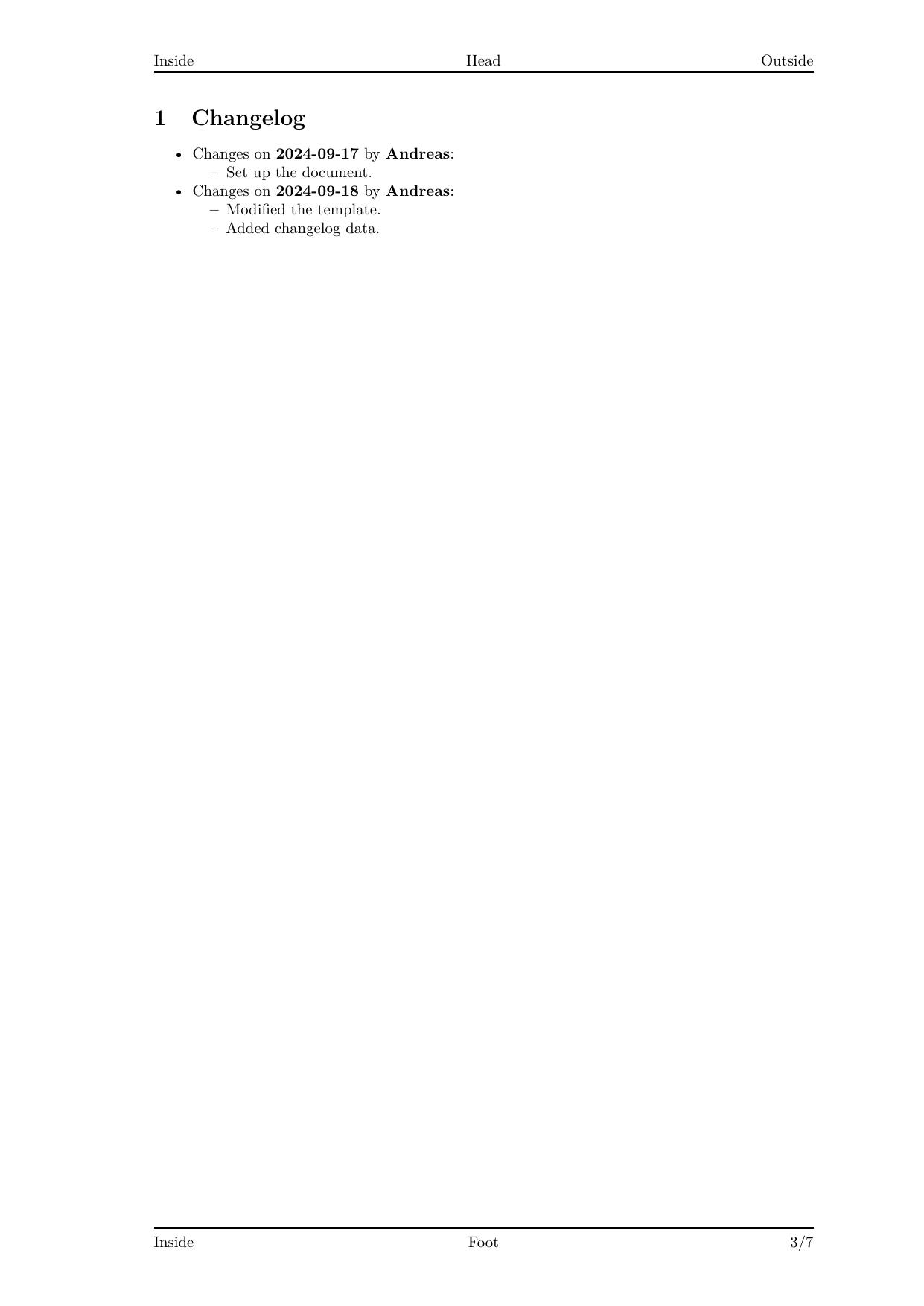
And once more, if you don't want to run the command yourself, you can download the generated PDF.
After completing these steps, your project directory should look like this:
$ tree
.
├── build
│   ├── solution_pro_1.pdf
│   ├── solution_pro_2.pdf
│   ├── solution_pro_3.pdf
│   ├── solution_beginner_1.pdf
│   ├── solution_intermediate_1.pdf
│   ├── solution_intermediate_2.pdf
│   ├── solution_intermediate_3.pdf
│   └── solution_pro_1.pdf
├── img
│   └── image.jpg
└── src
    ├── bib
    │   └── bibliography.bib
    ├── md
    │   ├── front_matter.md
    │   ├── solution_pro.md
    │   └── solution.md
    ├── meta
    │   ├── changelog_pro.yml
    │   ├── style_pro.yml
    │   └── style_intermediate.yml
    └── templates
        ├── template_pro.latex
        └── template_orig.latex
Conclusion
That wraps up the tutorial! I hope this guide has helped you understand how to generate beautiful documents using Markdown and Pandoc, following the Docs as Code approach.
If anything is unclear, if you find any errors, or if you have any other feedback, feel free to reach out!